Git是一个分布式系统,我们之前的git仓库都是在本地的,但实际上你可以搭建一个git服务并允许其他机器访问你的git仓库。
GitHub就提供了这种服务,我们可以从github上clone一个项目:
git clone git@github.com:yalewoo/YLW3.git
除了创建文件外,git clone还会克隆整个.git目录到本地,也就是包含了整个项目的所有文件和历史记录。克隆以后,本地的git仓库和github上的仓库包含的内容是一样的,也就是分布式的特点:每一份机器上都包含了所有的信息。当许多人进行合作的时候,就会有多个包含所有信息的仓库。当然为了方便大家相互同步代码,一般大家还是会使用Github上的仓库作为“集中式”的主仓库。
除此之外,git clone还会修改配置文件.git/config ,记录remote的相关信息:
[core]
	repositoryformatversion = 0
	filemode = false
	bare = false
	logallrefupdates = true
	symlinks = false
	ignorecase = true
[remote "origin"]
	url = git@github.com:yalewoo/YLW3.git
	fetch = +refs/heads/*:refs/remotes/origin/*
[branch "master"]
	remote = origin
	merge = refs/heads/master
使用git branch –all可以查看本地和远程的所有分支:
$ git branch --all
* master
  remotes/origin/HEAD -> origin/master
  remotes/origin/master
实际上git管理远程分支和本地分支的方式是一样的,他们都是一个对于commit的reference 。 现在,本地和远程master分支都指向同一个commit
$ git show-ref master
21f39eb03beef7e0343b348642e109339f2c47d6 refs/heads/master
21f39eb03beef7e0343b348642e109339f2c47d6 refs/remotes/origin/master
现在在本地提交一个commit
$ git commit -m "add readme"
[master f50b552] add readme
 1 file changed, 2 insertions(+), 1 deletion(-)

$ git show-ref master
f50b552f03497e496a8b1965b3aa2ab62a109eb3 refs/heads/master
21f39eb03beef7e0343b348642e109339f2c47d6 refs/remotes/origin/master
可以发现,本地的master指向了新的commit. 而远程的master还停留在远程旧的commit上。使用git push就可以把本地的修改推送到远程:
$ git push
Enumerating objects: 5, done.
Counting objects: 100% (5/5), done.
Delta compression using up to 12 threads
Compressing objects: 100% (2/2), done.
Writing objects: 100% (3/3), 294 bytes | 294.00 KiB/s, done.
Total 3 (delta 1), reused 0 (delta 0)
remote: Resolving deltas: 100% (1/1), completed with 1 local object.
To github.com:yalewoo/YLW3.git
   21f39eb..f50b552  master -> master

Yalewoo@DESKTOP-DU53APD MINGW64 /z/Git/YLW3 (master)
$ git show-ref master
f50b552f03497e496a8b1965b3aa2ab62a109eb3 refs/heads/master
f50b552f03497e496a8b1965b3aa2ab62a109eb3 refs/remotes/origin/master
可以看到,现在远程的master和本地的master是指向同一个commit了。
pull
如果我们在push之前,其他人的修改已经提交了,也就是我们本地记录和远程不一样了
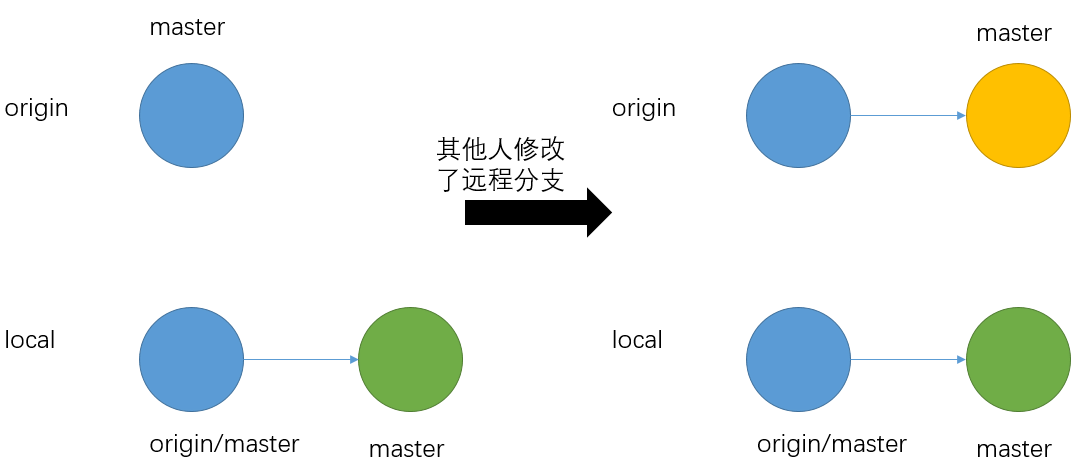
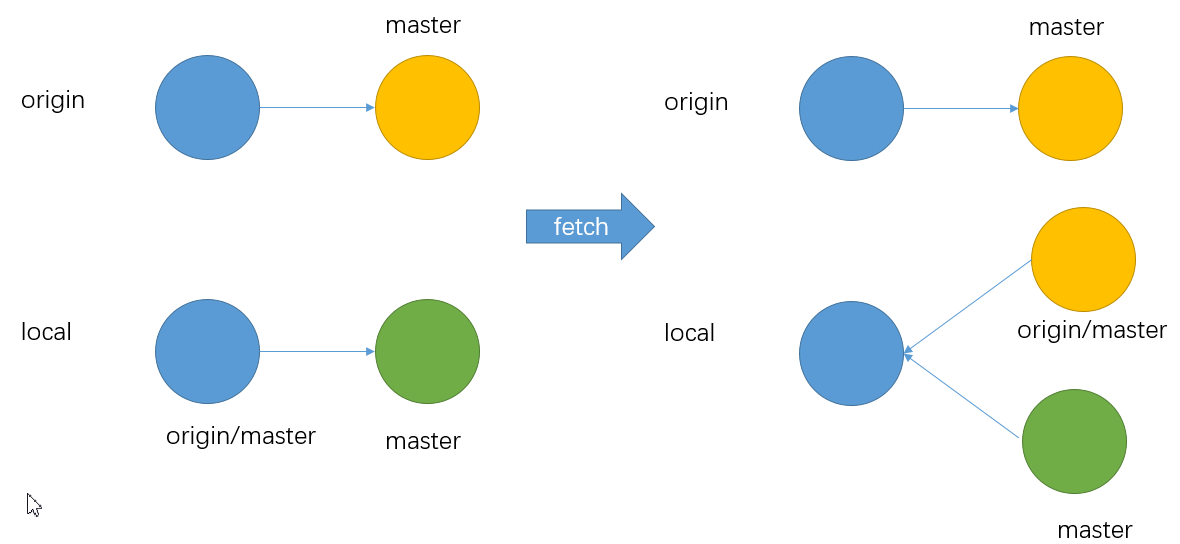
我们就需要fetch远程的分支,在本地merge然后再push
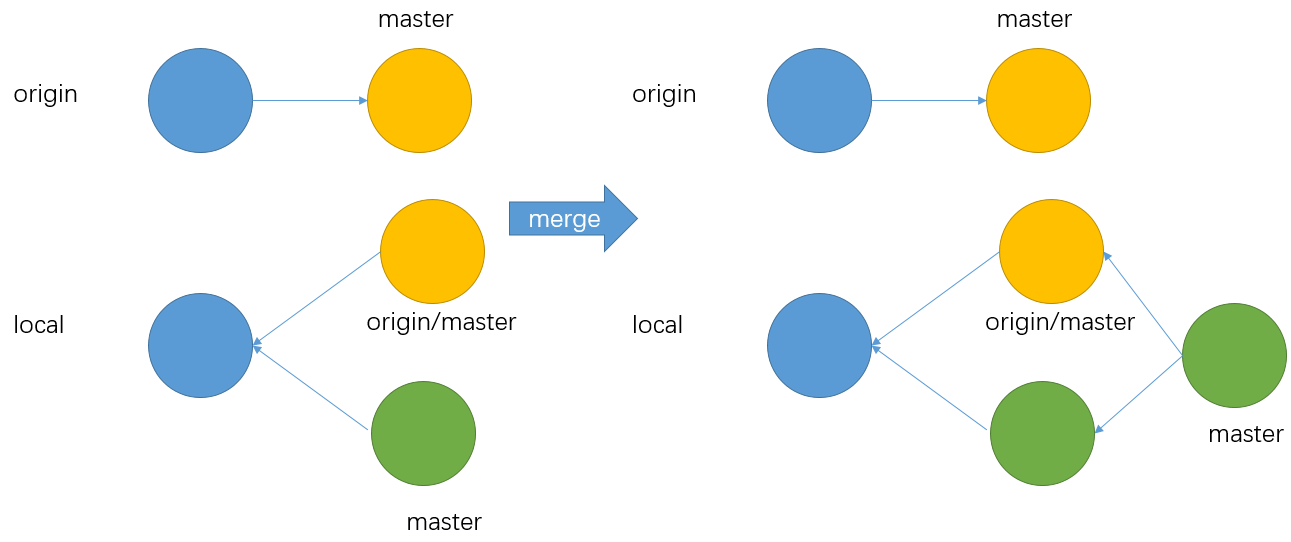
然后就可以push了
 支付宝打赏
支付宝打赏  微信打赏
微信打赏